

![[Valid RSS]](http://maniek86.xyz/cmsesus/uploads/image/valid-rss-rogers.png "Validate my RSS feed")

Homebrew 486 computer - Prototype PCB version
[Back to the homebrew computers page]

The finished result before adding the ISA slot
Specs
- 486 CPU running at max 12 MHz
- 256KB of SRAM
- 128KB of ROM
- Motorola 68681: Serial port
- 8255: 24 I/O lines
- IDE interface
- XC95144XL CPLD for glue logic
- 8-bit ISA slot (added later)
Current state: Lying in my closet, broken (some wire probably came loose. Never looked deeper into it as I started working on other projects).
Repository with various stuff made during development: https://github.com/maniekx86/homebrew_prototype_486
History
My journey into FPGAs and CPLDs
At the beginning of 2025, my teacher gave me some interesting electronic scrap (Big thanks to him! This scrap also led to the development of the M8SBC-486). It was internal equipment from an old telephone recording system. He had multiple systems like this to scrap! The systems were powered by Mini-ITX motherboards with VIA C3 or C7 CPUs. These boards are pretty much integrated: audio, VGA and Ethernet are built into them. They also have one PCI slot. A proprietary card was plugged into that PCI slot and connected to another special card with analog phone connectors on the back (via ribbon cable). The PCI card had an Xilinx Spartan II FPGA (XC2S100) and the second card had an Xilinx XC95144XL CPLD. I was curious about these ICs because at that time, I didn't know how to use or program them practically. First, I looked into the FPGA. The PCI card had everything necessary to work with the FPGA outside of a system. Many of its I/O signals went to the PCI connector, so I could just solder to them. Another cool fact was that JTAG was exposed on an unsoldered pin header. The power was also managed well. The two lower voltages required for the FPGA (2.5 V and 3.3 V) were generated by two voltage regulators connected to the 5 V rail of the board, so to power everything, all I had to do was connect 5 V to the 5 V rail. The original FPGA configuration was loaded by an ATMega128 which was also present on this board. Its programming pins were exposed on a header. I played around with the ATMega and made a simple LED blink for fun. In the end, though, I still wondered how to work with the FPGA...

At the time, I was not familiar with any hardware description languages, such as VHDL or Verilog. I wasn't motivated enough to learn any of them back then. That was mostly because I noticed that Logisim-evolution has a HDL generator. It basically allows you to move a simulated design to an FPGA. There was a limit though: not every component could be synthesized into HDL and there were a few issues that I will mention later. Still, that was enough to make an LED blink or do more.
Second, the more important thing was how I would synthesize the HDL code into something that the FPGA needs? Or how is it even programmed? After doing some research online, I found out about AMD Vivado and Xilinx ISE. The first one is the current development tool for modern Xilinx (AMD) FPGAs. The latter is an older tool that was discontinued around 2012-2013. Its first versions date back to the '90s. I forgot to mention that this CPLD and FPGA were released at the end of the '90s. Since Vivado was released in 2012, it doesn't support these. Now, regarding ISE: The latest version of ISE is 14.7, released in 2013. For some reason, the XC95 CPLD family is still supported, but the Spartan II was dropped in version 11. This means that I not only had to use an aged Xilinx ISE, but it also had to be an older version - 10.1 from around 2008. Thankfully, I managed to install it without any problems on my 64-bit Windows 10 PC. After installation, I opened the "Project Navigator", but I wasn't sure what to do next. I searched the internet for tutorials and found a quick start guide in PDF that was nicely explained and made especially for version 10.1. I followed it, but instead of using the FPGA used in the tutorial, I selected the Spartan II XC2S100 FPGA that I had. There was even example VHDL code for a simple counter. I modified it enough to make it a frequency divider. It also explained how to assign pins on the FPGA. I assigned the input clock to a pin to which a 16 MHz crystal oscillator was connected on that PCI scrap board and I assigned the output to a random exposed I/O pin. When I started the synthesis process, I received an "Unable to link" error. I was kind of annoyed. I googled it and found a solution. It required deleting a file from the toolchain, which was unusual, but it allowed me to continue. After that, the synthesis went successfully and the Xilinx iMPACT utility appeared. It's a built-in utility for programming CPLDs, FPGAs, configuration ROMs, etc. Next, I had to figure out how to upload the result (bitstream) to the FPGA.
Xilinx programming cables are expensive, so that was not an appealing option. I wondered if it was possible to use a microcontroller as a programmer. After searching the internet again, I found the xvc-pico project. It turns a Raspberry Pi Pico into a programmer that can be used with Xilinx ISE. However, after setting it up, I encountered an issue: iMPACT from Xilinx ISE 10.1 does not support the Xilinx Virtual Cable (XVC) protocol, which is used by the xvc-pico project and many other DIY programming projects. According to the GitHub description, this project works with Xilinx ISE 14.7. However, I didn't want to reinstall ISE or install a second ISE just for programming. After some research, I found that I could install only the "LabTools" from ISE 14.7 (which includes the newer iMPACT) without altering the existing ISE installation. I did it. I managed to connect the xvc-pico programmer to the iMPACT! The only question was whether the iMPACT utility from the newer ISE 14.7 would support such old chips that aren't supported by the IDE part. I clicked on boundary scan and the XC2S100 was detected! I was also asked for a .bit file. Amazing! After clicking "Program," I noticed that the LED I soldered to the exposed I/O pin was blinking. Success!

Later on, I learned how to properly generate HDL code in Logisim-evolution and import it into Xilinx ISE through experimentation. I was skeptical that the code generated by the newer Logisim Evolution would be compatible with the old ISE, but it turned out that the VHDL (the language I chose for the ISE project) hadn't changed since then and worked fine. I only needed to follow FPGA design rules, such as not gating clocks. In the first days of experimentation, I even managed to design a simple graphics card in Logisim-evolution and all of it worked!

You might be wondering why I'm writing about the Spartan II FPGA and not the XC95144XL CPLD used in this project. CPLDs and FPGAs are generally very similar in terms of design. Both can be programmed with the same HDL languages and many of the same rules apply to both. The main differences are that CPLDs have much smaller capacity than FPGAs and CPLDs have nonvolatile memory to store their configurations, whereas FPGAs require external ROM. When I started working on the homebrew computer, I also started designing in Logisim-evolution, converted the design to VHDL and uploaded it to the CPLD using the xvc-pico programmer. Also, the Spartan-II FPGA introduced me first to the world of FPGAs and CPLDs. Below is the last photo regarding this topic: testing the CPLD outside of its board. Now, let's finally dive into the homebrew.

Initial design
The idea for this homebrew project struck me one day while I was reading the official Intel datasheets for the 386 and 486 chips out of curiosity (at the end of April 2025 when I had about two weeks of free time). I noticed that bus control of these chips was not very complicated for me. I thought, It would be ridiculous if I took one of these chips and used my own glue logic to make it execute code. So, I looked through my drawers to see what parts I had. I also remembered that I had recently acquired a few XC2S100 FPGAs and XC95144XL CPLDs, with which I had experimented. I found a small, 15*9 cm prototype PCB, a bunch of small SRAM chips, a few flash ROMs and a lot of leftovers from previous homebrew projects, like a Motorola 68681 UART, an Intel 8255 I/O, a MAX232 RS-232 driver and a lot of 74 ICs. Regarding the CPU, I ultimately decided to use a 486. I considered a 386, but noticed the differences between the two chips are minimal. Both have 32-bit data and 32-bit address buses. The 486 is, of course, slightly larger, but that didn't discourage me. Next, I had to decide whether to use the XC2S100 Spartan II FPGA or the XL95144XL CPLD. Both use 3.3V for I/O but are 5V input tolerant. The XC2S100 that I had on hand was in a TQFP-144 package and had more I/O pins, while the CPLD was smaller and in a TQFP-100 package. After considering these ICs, the stuff I had in my drawers and pin count calculations, I decided to use the CPLD. The main reasons were that the CPLD has nonvolatile storage for its configuration and I had a PCB adapter to solder it onto the prototype board.
After that, I moved on to selecting the rest of the components, such as the RAM, ROM and I/O.
For RAM, I chose 256 KB. I used eight 32 KB SRAM cache chips that I had (W24M257AK-15). I had other RAM chips, but for an easier design, I needed to make the memory 32-bit wide. Basically, I needed at least four identical RAM chips. The cache chips were perfect because I had eight of them on one of my retro motherboards. I could easily borrow them for this project.
For the ROM, I decided to use a Winbond W29EE011 flash chip. It has 128 KB. I decided to connect it to the CPU via the CPLD. I planned to make the data bus switching in the CPLD because to interface 8-bit memories with a 486, you need to correctly swap the data bytes between the 8-bit device bus and the 486's 32-bit bus. I will explain it more later.
For the rest of the I/O, I used a classic Intel 8255 I/O chip with 24 I/O lines and a Motorola 68681 DUART chip (yes, an IC with a Motorola bus interface!). To implement the IDE interface, I only needed two bus transceivers and one buffer.
Working on the board
Soldering
Once I knew what I was going to use, I began planning how to arrange the components on that small prototype board so that everything would fit.

I managed to fit everything in. I put some smaller ICs under larger ones. I even had space left over for headers and other things like LEDs. I made the CPU socket out of pins taken from precision IC sockets. I didn't solder all the pins because many of them were repeated VCC or VSS or pins that I didn't intend to use.
I could have used a larger prototype board, but I said that this small board was all I had in storage. As of time of writing, I am still a student who doesn't earn money, so I use what I have or what I find in scrap.
And so, I started soldering.


Glue logic and how 486 works
Meanwhile I started working on the glue logic. It was April 2025 and I didn't yet know any hardware description languages (VHDL / Verilog). I still was making FPGA designs in Logisim-evolution, so for this homebrew I decided to make the design in it!
Below is image of the final design, with the later on added ISA section.

There is a lot of logic as you can see. It was made in pretty hacky way: something didn't worked - I just slapped extra logic to fix it rather than redesigning something so that's why it is messy. From the larger sections we can differentiate:
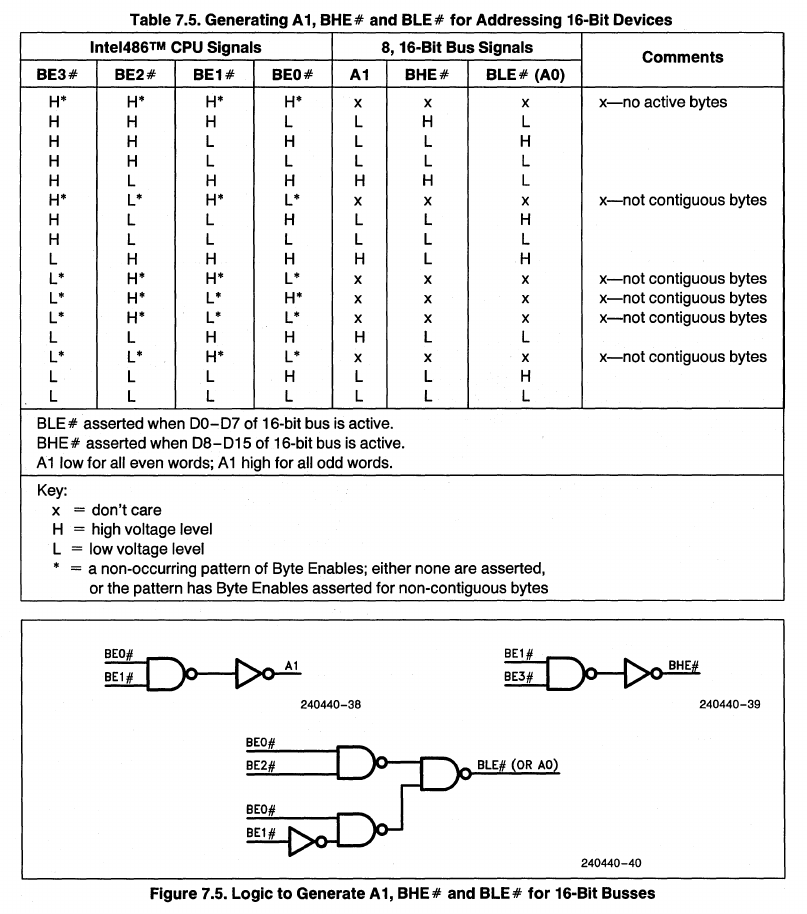
BE to A0/A1:
486 doesn't have A0 and A1 signals that are required for 8 and 16-bit devices. We can "extract" them from Bus Enable signals. Official 486 datasheet even shows implementation example
32-bit to 8-bit data bus transceivers:
Keeping Bus Enables in mind, I will also explain how to make a 32-bit 486 work with 8 and 16-bit devices. The 486 has BS8 and BS16 signals (Bus Size 8/16) for interfacing with such devices. Activating these signals during a data transfer cycle informs the processor that the device cannot transfer more than 8 or 16 bits at once. As a result, the 486 processor splits larger transfers into multiple smaller ones. For example, a 32-bit transfer would be split into four 8-bit transfers if the BS8 signal were pulled. It sounds easy, but there's a catch. We would expect each byte to be transferred on the D0-D7 signals of the 32-bit data bus, but that's not the case. A byte written into an address that is not divisible by four is placed on the corresponding byte of the 32-bit bus. This means we have to swap bytes in both directions to access an 8-bit device. A similar thing happens with split 16-bit device transfers. Here, there are two possibilities: the data is accessed on the lower or higher 16 bits of the 32-bit bus. Below is a photo of that concept from the 486 datasheet.
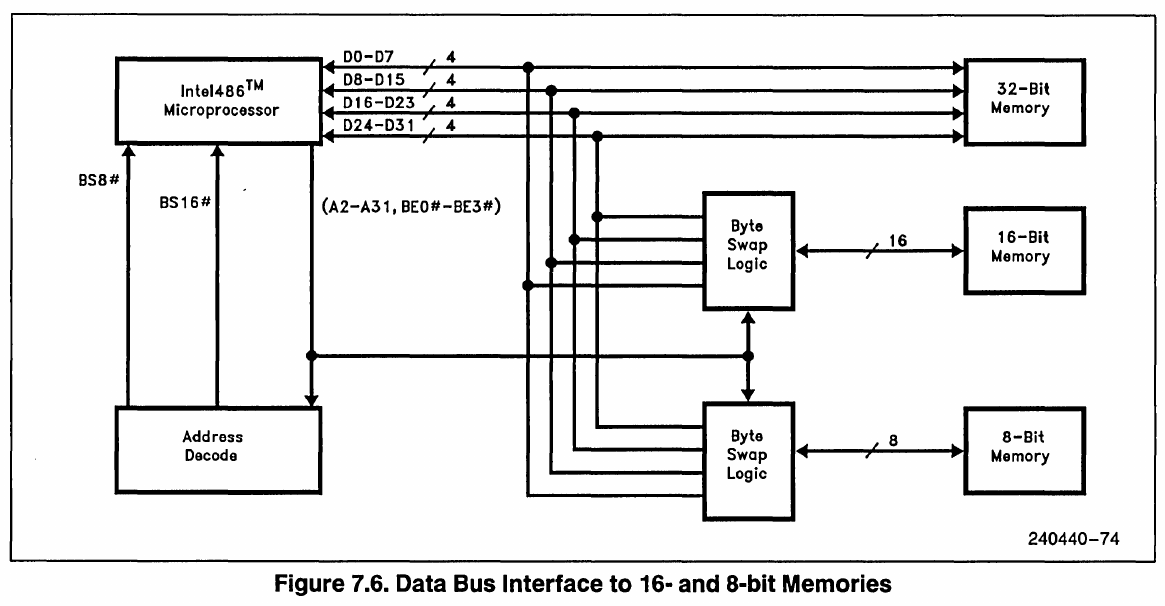
In the CPLD design, I use bus transceivers - more specifically, a multiplexer and a demultiplexer - to move the bytes onto the correct byte of the 32-bit 486 bus. This section is activated when an 8-bit device (ROM or ISA) is accessed. The logic is also driven by Bus Enable signals that tell it where to move the data.
Address decoder:
This section selects the correct devices based on the address that the CPU is trying to access.
The address map for this homebrew is as follows:
- 0x00000000 - 0x0003FFFF: RAM (256 KB)
- 0x00080000 - 0x000800FF: 8255 I/O
- 0x00080100 - 0x000801FF: Motorola 68681 DUART
- 0x00080200 - 0x000802FF: IDE interface
- 0x000A0000 - 0x000DFFFF: ISA
- 0x000E0000 - 0x000FFFFF: ROM
- 0x80000000 - 0xFFFFFFFF: ROM (repeated)
I decided to map all devices to the memory space instead of the I/O space. This was because I didn't fully understand the concept of memory and I/O separation in x86 architecture. Later, when I added the ISA bus, I forwarded all I/O accesses to the ISA bus anyway. I also connected the I/O, DUART and IDE to the 32-bit bus so that they appear as 32-bit devices though they ignore the data bits they don't use. For example, to access the second register of the 8255, I have to address +4, which puts the data on D0–D7 again to which the IC is connected. I did it this way to make the design simpler. I could have connected it via the bus swapper; however, my initial plan was to leave it exclusively for ROM. In the initial design before adding the ISA, the bus swapper could only pass data one way from the ROM, which was another factor. The thing is that ROM requires such a swapper because the CPU expects instructions to be stored sequentially in memory. With I/O devices, we can do odd things like this because we can handle it in the code.
RAM driver:
The RAM is 32-bit, like the CPU. To make it work, I just have to activate the correct chips corresponding to the bytes they drive and pull the read or write. This section does that.
Waitstate generator:
Some onboard devices cannot run as fast as the CPU. To make them work, I need to slow down the CPU. To do so, I can use the RDY signal, which extends the duration of the transfer cycle. Depending on the selected device, I hold the RDY signal for a predefined number of clock cycles. The only exception is the 68681 which has a DTACK signal. In a Motorola system, this signal tells the CPU that the device is ready. In that case, the DTACK signal is simply translated to the RDY signal.
Clock divider & reset:
This simple circuit divides the 24 MHz input clock into a lower clock. Initially, I tested the board with a lower clock frequency than 12 MHz, but I will cover that more later. The reset circuit is just a simple counter that holds the reset signal until a counter stops counting. It is made for power-on reset delay and reset input debouncing.
There's more to this logic, but it's difficult to explain what each part is doing now (a year after creating it). The project file is available on the GitHub repository for this project.
Testing and further soldering
On the fourth day after starting the project (it was free time for me and I was so obsessed with this project that I worked almost all day), I actually managed to get the 486 running! The board was still incomplete (I had only soldered the CPU, CPLD and ROM), but I could already see activity on the CPU bus. I would also like to take a moment to thank my school for appreciating my other projects (like my 16-bit homebrew computer) in competitions. The rewards from these competitions allowed me to buy a real oscilloscope, which helped a lot with debugging this and later projects. Below is an image from the first run! I was overjoyed by the sight of a 486 CPU operating outside a motherboard.

The program in the ROM was just a simple infinite jump in the 16 byte reset vector area. Using the scope, I could clearly see the CPU fetching data from the 8-bit ROM via the byte swapper in the CPLD.
I continued work, both with soldering and the CPLD design. The next things added were: RAM, 8255 I/O and 68681 DUART.

Also, the process wasn't as simple as connecting the peripheral and adding support for it in CPLD. With some things, I actually had to spend many hours to make them work reliably. I also accidentally soldered a wire to the wrong pin a few times.


Software

With more peripherals to be used, more code was needed. Since programming in assembly is tedious, I had to switch to a lower-level programming language to make better progress. The advantage of 386 and later CPUs (including 486) is that they have a native GCC toolchain, which allows us to write code in C.
However, there's a small problem with x86 CPUs. Due to compatibility reasons, despite having a more powerful "protected" mode (which GCC targets), the 386 and later CPUs run on power-on in "real" mode. Real mode is a compatibility mode that makes the CPU behave like an 8086, allowing it to run legacy applications. For example, MS-DOS runs in real mode. Since I don't plan to run such operating systems on this computer, I had to write an assembly snippet that changes the CPU's running mode from real to protected before jumping to C code compiled with GCC.
Before adding the IDE controller, the software was pretty simple. It consisted of simple routines to drive the I/O chip, control the HD44780 text LCD and drive the Motorola DUART, among other things. It worked like a more powerful Arduino.
Meanwhile, I also tried increasing the CPU clock frequency. I initially started with just 750 kHz, but slowly increased the clock. I found the sweet spot at 12 MHz. At this frequency, the DX2 CPU ran at 24 MHz internally! I had to increase the wait states for the onboard devices. It was pretty much impossible to go further because of how I built this computer, but 12 MHz is still a lot.
IDE and ISA

The first thing I did was finish soldering the IDE controller. The controller is simply connected to the CPU bus via buffers. The buffers prevent glitches that might occur due to long IDE cables. The IDE controller was connected similarly to the 8-bit onboard peripherals - with no byte/word swapping buffers, it is directly connected to the 32-bit CPU bus, ignoring the upper 16 bits.
After adding the IDE controller, I rewrote most of the software so that it would work similarly to the software on my Motorola 68000 homebrew. Basically, it became a custom DOS again - a file browser over serial with the capability to run programs written and compiled for it.
Unlike the IDE controller, adding an ISA was not initially planned. I got the idea when I was bored with the board's capabilities. I thought it would be cool to connect an ISA graphics card to get a video output from this computer. I found an 8-bit ISA slot in my spare parts bin. I realized that I could solder it to the right side of the board. The number of solder pads was almost ideal! Only one row was missing. Regardless, I soldered the slot onto the board. Meanwhile, I started researching the 8-bit ISA. I found out that it was pretty simple: a 20-bit address bus, an 8-bit data bus and four control lines for memory read/write and I/O read/write.
This time, I decided to properly connect it to the CPU via the byte swapper. Initially, I wasn't sure if the CPLD could handle bidirectional signals, but it could! I upgraded the "read only" byte swapper (which was only used for ROM), to allow writes as well. Ultimately, byte addressing on ISA was done correctly - bytes were accessed one after another.
The first device I tested was an ISA 144-channel GPIO card (Advantech PCL-722 Rev.B). I got this beast from industrial scrap. It's essentially six 8255s on one card. Programming it was simple since I had used the 8255 multiple times as you may know. In the end, it worked fine! Photo below.

Next, I wanted to get a graphics card working. At the time, I only had two ISA graphics cards: Trident TVGA8900C and Cirrus Logic GD5428. Both were made for 16-bit ISA. Thankfully, the first one was capable of working with 8-bit ISA, so I decided to use it.
I didn't know much about BIOS and video BIOS concepts, so my initial idea for initializing the card was to simply call the address of the video BIOS in real mode. That failed miserably. After debugging it extensively, I ultimately couldn't get the video BIOS to initialize the card. Luckily, I found this project while searching for solutions on the internet: GitHub project mega-iso-vga by marcin-chwedczuk, which was based on the avr-isa-vga project from www.tinyvga.com. This project included the TVGA9000 video BIOS as a C source code. I wondered if it would work on the TVGA8900C, so I grabbed the code, modified the memory and I/O access functions to use the ISA bus on my homebrew, compiled and ran it. And... after connecting a VGA cable to the TVGA8900, I saw that the monitor detected a signal! There's was no image yet, but it was a big step forward!

No image (only sync present) problem was caused by a missing -12 V rail. The digital to analog converter IC in the graphics card required this voltage in order to function correctly. After supplying the voltage from an ATX PSU, I could finally see something on the screen. The avr-isa-vga project provided snippets for initializing the card in 256-color 320x200 graphics mode (mode 13h) and standard 16-color 80x25 text mode (mode 03h). The first one worked flawlessly!

However, there was a problem with the 80x25 text mode. It looked like the accesed address was multiplied by two (characters printed had a blank gap between them). I spent some time searching for the reason why. I decided to look into the TVGA graphics card's registers. I found a nice text file online describing these registers. While reading it, I found a register with an interesting note about TVGA8900C:
3C4h index 0Ch (R/W): Power Up Mode Register 1
bit   0  Fast Decode if set, Slow if clear
      1  (9000 & LCD9100) If clear 0 Wait states,
              if set bit 6 determines number of wait states.
      4  If set enable post port at 3C3h, at 46E8h if clear
      5  (8900C)  If set enables access to upper 512KB in non-paged modes
                  Must be clear in text and CGA modes.
         (9000 & LCD9100) If set uses 2 DRAMs, 4 if clear
      6  (9000 & LCD9100) If bit 1 is clear this bit determines the number
              of wait states. If set 2 Wait states, 1 if clear.
    5-6  (88xx and 89xx) 0=256K chip, 1 = 2 DRAMs, 2 = 4 DRAMs, 3 = 8 DRAMs.
      7  If set VRAM bus setting is 16, 8 if clear
Note: This register can only be changed if New Mode Control 1 (3C4h index 0Eh)
      bit 7 is set
Notice bit 5. It says it's a TVGA8900C feature and it must be clear in text modes. I examined the code from the avr-isa-vga project and noticed that this bit was set to 1 during setup. So, I fixed it. To my eyes, the problem was gone! It also didn't affect the graphics mode.

Below is a nice demo of a 3D rotating wireframe cube that I quickly wrote.
Various issues
There were several issues with this project that I didn't include in the previous text, so I'm listing them here. One issue is that only the AMD and Cyrix 486 CPUs worked! For some reason, Intel 486 didn't want to work on this board. I don't know what the issue was, but the fact that the other two CPUs worked made me not look into it. I suspect that missing VSS and VCC pins or sensitivity to power delivery could be the causes, but who knows? Update: Some users told me that Intel split the power rails in the 386/486. This may be the case.
The board also liked a lot just not to work. Fixes included pushing the ICs into the socket harder and moving the wires on the underside a bit.
The Logisim-evolution VHDL generation was imperfect as well. One issue I encountered was this one - a problem in which the bidirectional I/O ports were generated incorrectly if there were multiple of them. I had to manually edit one line in VHDL source each time I exported the design to fix that. At some point, I even wrote a Python script to do this for me.
Summary
After getting the graphics to work and writing some software, I got bored with this project mainly because of its limitations. I tried to get a few ISA music cards to work in AdLib mode, but I failed every time mainly because of the ISA PNP feature. My programming skills and the board's stability were not great. The computer is currently sitting in my closet as a souvenir because it's broken! I left it in the closet for a while and when I tried to get it running again, it just didn't work. I suspect something came loose. I didn't look into it because I started working on other projects at that time. Maybe someday I will look into it...
In any case, I consider it a big success. I don't think many people before me got a 486 CPU to run on such a board and I think it was great research and exercise that led to the creation of my bigger project, the M8SBC-486!
Next: M8SBC-486.